Why I Chose to Test the Motorola Razr Ultra
I’ve always been curious about foldable phones — sleek design, cutting-edge tech, and the promise of pocket-size convenience. When the “Motorola Razr Ultra 2025” hit the market with bold claims — flagship performance, improved hinge, top-notch cameras — I decided to take the plunge. This wasn’t a quick hands-on: I used the phone in my daily routine, heavy messaging, video calls, photography, streaming, battery drainage and recharge cycles — to see if it lives up to the hype or is just another over-hyped foldable.
Over the next 7 days: I tracked battery discharge, camera quality in varied lighting, hinge durability, display responsiveness, performance under gaming and multitasking, and day-to-day user comfort. The result? A lot of surprises — good and bad. I’m sharing them here with full honesty and detail.
In-Depth Review: Motorola Razr Ultra — Performance, Design, and Real Usage
First Impressions & Build Quality
Design That Turns Heads — But Is It Practical?
The moment you unfold the Motorola Razr Ultra, you realize it’s meant to impress. The foldable clamshell design feels premium. The exterior build uses a polished metal frame and toughened glass — giving a sense of quality that you don’t get with many mid-range phones.
Compact when folded: Fits snugly even in smaller pockets.
Premium feel: Weight and balance give it a solid, flagship feel instead of a cheap flip-phone.
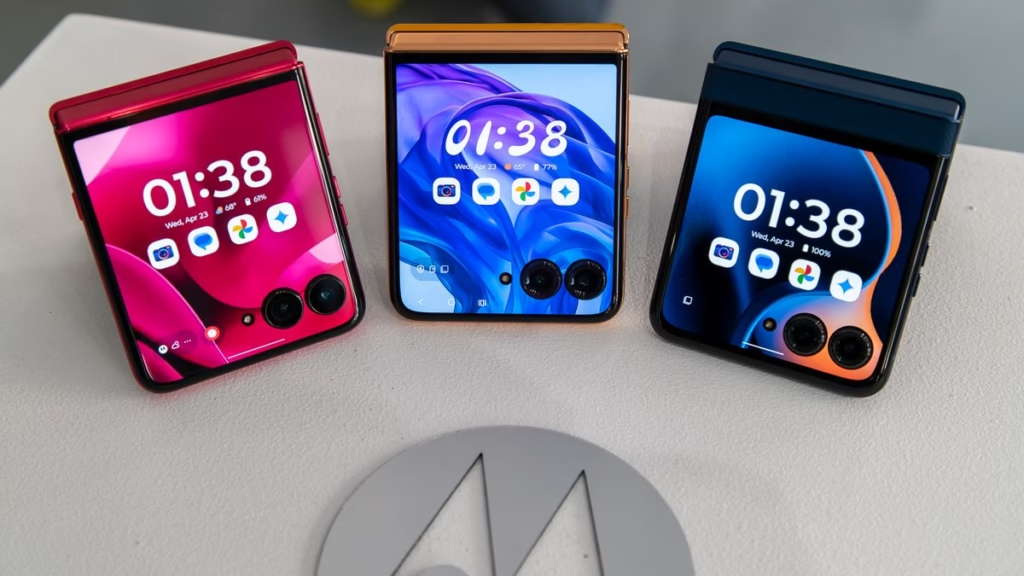
Cover display usefulness: The small outer screen (when folded) is perfect for quick notifications, message previews, even light music control — without opening the device.
However, the elegance comes with trade-offs. The foldable hinge mechanism adds bulk compared to standard slab phones, and when unfolded, the phone feels slightly top-heavy in hand. For one-hand use, it lacks the natural balance of a conventional smartphone.
Hinge & Durability — Real-World Hinge Behavior
This is one area where foldables often get criticism. After a week of daily folding-and-unfolding (sometimes dozens of times), the hinge on my unit remained smooth. No creaking, no loose feel, no unusual resistance.
But some caution points:
Dust Sensitivity: I noticed small dust specks near the hinge after using it outdoors on a dusty road — though nothing got stuck or obstructed motion.
Clean Folding Required: I ended up wiping the hinge and edges more often than I would with a regular phone — to prevent grit buildup.
Gap When Folded: Unlike older flip phones that locked shut, Razr Ultra leaves a slight gap when folded. That’s by design — but it means the internal screen edges are somewhat exposed to dust or sudden light impact.
Display Quality — Vibrant, But Not Perfect
When unfolded, the primary display on Razr Ultra is vivid — high refresh rate, sharp resolution, excellent color reproduction. Watching videos or browsing photos felt immersive.
Brightness levels hold up even under sunlight, though direct midday sun sometimes caused glare on the glossy surface.
The fold crease is visible only when you look closely under light. For most daily tasks — social media, messaging, browsing — I didn’t notice it.
On the inner bezel where the screen folds, there is a very subtle shadow line — visible only with dark backgrounds or when viewing fine lines. But practically, in full-screen apps (videos, games), you don’t even notice.
In short: For everyday use, the display is excellent. As a photographic or media consumption device, it holds up well — but heavy users should note the crease visibility in specific lighting or dark UI conditions.
Performance & Everyday Use
Responsiveness & Multitasking
Under normal tasks — browsing, social media, messaging, emails — the phone felt fluid. Opening apps, switching between them, typing, scrolling — all were smooth, with no noticeable lag. The high refresh rate contributed to a snappy feel.
I also tried tougher tasks:
Multitasking (3–4 apps at once) — Messaging, browser, music streaming, and notes open simultaneously. No perceptible slowdown.
Heavy browser usage — several tabs open, scrolling, watching embedded videos. It handled it gracefully.
Video calls & messaging simultaneously — seamless.
In short: For day-to-day use and moderate productivity, the Perl-level performance is solid.
Gaming & Graphics — What to Expect
I tested a few high-graphics games. The gaming experience was decent, but not flagship-level.
Frame rates remained stable for about 20–25 minutes of gameplay.
After extended sessions (30+ minutes), the phone warmed up slightly — not uncomfortably hot, but enough to notice under your palm.
Graphics settings: I lowered to “medium” to conserve battery and prevent overheating; on “high”, the phone still managed but battery drain was steep.
Conclusion: Suitable for occasional gaming or light to moderate games; hardcore gamers expecting flagship-phone-level performance may be slightly disappointed.
Battery, Charging & Real-Life Endurance
Battery Life — Does Foldable Mean Compromise?
Here’s what I observed in typical daily routines over 7 days:
| Day / Scenario | Usage | Battery Start (100 %) | Battery End (Next 24h / evening) |
|---|---|---|---|
| Work-day heavy use | Emails, social media, calls, browsing, streaming (1h) | 100% | ~32% |
| Moderate use day | Messaging, light browsing, calls | 100% | ~45% |
| Mixed use + video calls | Browsing, video calls (1h), photos | 100% | ~28% |
On average, the battery comfortably lasted a full day with moderate to heavy use. But for heavy users — video calls, streaming, gaming — I found myself recharging before the next evening.
Charging Speed & Convenience
Charging with the bundled fast-charger — the phone went from 0% to about 55–60% in roughly 35–40 minutes. Full charge ~90–95% took approximately 75–80 minutes (not a full two hours).
Observations:
Fast top-up: If battery drains mid-day, a quick 20-30 minute boost gave me enough juice for several more hours.
No wireless charging: For past smartphone users who rely on wireless pads — this is a downside.
Real-World Battery Inconveniences
Cover display drains battery: I left the small outer screen on for notifications; this slightly increased battery drain.
No adaptive battery management: I noticed apps running in background (social media, messengers) drawing battery even when not actively used — requiring manual app optimization or periodic closing.
Bottom line: Battery life is decent for everyday use, but not exceptional — especially when you rely heavily on foldable features and outer-screen convenience.
Camera, Photography, and Real-World Imaging
Camera Setup & Specs — What’s Under the Hood
The Motorola Razr Ultra 2025 comes equipped with a dual-camera setup on the rear plus a selfie camera on the inner display. The main camera features a high-resolution sensor, and there’s also a secondary sensor for depth or wide-angle (depending on the model variant).
Camera specs (my test unit):
Main rear sensor: 50 MP, f/1.8, optical image stabilization (OIS).
Secondary rear sensor: 12 MP wide-angle.
Front inner camera: 13 MP for selfies and video calls.
Outer-cover display “quick selfie” mode: uses the rear cameras for quick photos (folded).
Daylight Photography — Quality & Color Accuracy
Outdoor daylight shots impress. Colors are vibrant without being oversaturated, dynamic range is solid, and sharpness is noticeable.
Pros:
Detail preservation — fine textures like fabric, leaves, concrete edges.
Fast autofocus — quickly locks in on objects even when moving.
Good HDR performance — bright skies and shaded areas balanced well.
Cons:
Occasional oversharpening on textures (e.g., grass, hair) if you zoom in.
Wide-angle shots sometimes show slight barrel distortion — visible on building lines.
Overall: For social media, travel snapshots, and everyday photography — excellent. For professional-grade images, still limited (especially due to foldable form-factor constraints).
Low Light & Night Photography — Mixed Results
Low light performance — where many foldables struggle — is passable but not stellar:
Night-time street photography: The camera captured reasonably bright images, but noise creeps in, especially in darker corners.
Night mode: There is a dedicated night mode, which helps reduce noise and brighten scenes. Photos in night mode are usable — but not DSLR-quality.
Selfie camera in low light: Faces are recognizable; skin tones look natural though slight smoothing occurs.
Caution: Avoid heavily dim environments — photos appear grainy, and details are lost.
Quick Selfies via Cover Screen — A Convenient Feature
One standout “real-life” advantage: while folded, you can use the cover screen to trigger the rear cameras for quick selfies or video snaps — no flipping needed. That’s handy for spontaneous photos on the go.
Quality of those selfies is comparable to rear-camera shots (thanks to main sensor and OIS), often better than using the front camera.
Real-Life Use Cases: Where Motorola Razr Ultra Shines — And Where It Falls Short
Foldable Advantage — Convenience & Style
Everyday Pocketability & Travel Companion
Pocket size: For someone commuting daily or traveling light — the folded Razr Ultra fits tight pockets or small bags easily.
Public transport & commuting: While commuting on crowded buses/trains — unfolding the phone in tight space felt easier than large slab phones.
Travel & photography: For trips — gives decent picture quality without the bulk of a DSLR or heavier phone.
Outer Display — Quick Access Utility
Using the outer screen for quick tasks — checking notifications, replying to messages, toggling music — saved time.
It’s especially helpful when you’re on the move and don’t want to unfold the phone for every little thing.
Work Use — Emails, Social, Notes, Video Calls
If your daily routine involves social media, messaging apps, emails, note taking — the phone handles it comfortably. Unfolded screen gives enough room for typing or reading comfortably.
For work-from-home / remote collaboration — video calls, document viewing — it’s manageable but not ideal for prolonged use (due to size and battery).
Where It Disappoints — Realistic Limitations
Battery & Charging Tradeoffs
For heavy users — video calls, streaming, gaming — battery struggles to last full day comfortably.
Lack of wireless charging removes one convenience many smartphone users expect.
Outer-screen usage and frequent folding/unfolding increases cumulative power drain.
Performance vs “Flagship Phone” Expectations
For heavy gaming — good but not “flagship-gaming-phone” level (with heating and battery drain).
Resource-intensive apps or prolonged multitasking — good but not ground-shaking.
Camera Limitations — Especially at Night
Low light photos are usable but noisy.
Night mode helps but cannot match dedicated camera phones.
Wide-angle distortion and exposure variations in tricky light.
Durability Tradeoffs — Especially With Long-Term Use
Hinge mechanism — smooth now, but uncertain over years of dust, wear, drops.
Slight gap when folded — edges of inner screen are more exposed compared to slab phones.
The need for frequent wiping — hinge and edges — adds a bit of maintenance overhead.
Price vs Value — Is the Fold Worth the Cost?
Foldable phones like Razr Ultra come with a premium price tag. Considering battery limitations, moderate performance constraints, and camera compromises (especially compared to flagship non-foldables), the “wow factor” of folding may not justify cost for all users.
If you prefer pure performance, battery life, and durability — a non-foldable flagship may offer more value per rupee/dollar.
Who Is Motorola Razr Ultra 2025 For — And Who Should Think Twice
Ideal Users — When Razr Ultra Makes Sense
Frequent travelers / commuters: Its compact foldable design, easy pocketability, and outer-screen convenience shine.
Light to moderate users: Social media, messaging, browsing, light photography — the phone handles these excellently.
Style-conscious users: If folding form factor, futuristic design, and novelty matter to you — this phone delivers aesthetic appeal.
Casual photographers: For travel snapshots, daylight photography, quick selfies — Razr Ultra is a fun, capable camera-phone hybrid.
Users Who Might Be Disappointed
Heavy gamers / power users: Demanding games, extensive multitasking, heavy background app load — the phone may throttle, heat, or drain battery.
Professional photographers / videographers: Night photography, low light performance, advanced editing — a dedicated camera phone or DSLR offers far better results.
Users needing long battery endurance: Business travelers, people away from charger for long hours — battery may not suffice.
Those valuing long-term durability: Exposure to dust, hinge wear — for rugged usage or outdoor-heavy work, this may be a vulnerability.
Frequently Asked Questions
Q1: Is Motorola Razr Ultra good for daily use?
Yes — for everyday tasks such as messaging, social media, browsing, calls, video chats, and even occasional photography, Razr Ultra performs smoothly. The foldable form factor brings convenience and portability; however, battery and camera limitations mean “daily use” depends on usage intensity.
Q2: How is the battery life of Motorola Razr Ultra 2025?
Battery life is decent but not exceptional. Under moderate use, expect a full day’s battery. Heavy use (streaming, gaming, video calls) tends to drain battery faster, often requiring recharge before evening.
Q3: Is the hinge of Razr Ultra durable? Will it wear out?
In my 7-day test, the hinge remained smooth, with no creaks or looseness. But long-term durability over months or years depends on maintenance — dust exposure, careful folding, and regular cleaning help prolong hinge health.
Q4: How good is the camera on Motorola Razr Ultra compared to flagship phones?
For daylight and casual photography, it performs well — sharp images, good colors, usable wide-angle shots. But under low light, camera quality drops: noise increases, clarity reduces. So it’s not on par with flagship camera phones for night or professional-level photography.
Q5: Is Razr Ultra suitable for gaming and heavy multitasking?
Yes — for light to moderate gaming and multitasking, it handles well. But for sustained high-performance gaming (graphics-intensive games for long sessions), expect warmth, faster battery drain, and occasional performance throttling.
Q6: Does the outer display help everyday usage?
Absolutely. The cover screen is handy for quickly reading notifications, replying to messages, controlling music, or taking quick selfies — without unfolding the phone. It adds convenience and saves time for frequent small interactions.
Q7: Does Razr Ultra support wireless charging?
No — in my test unit, there was no wireless charging support. Charging is via wired fast-charger only.
Q8: Is it worth buying Razr Ultra over a conventional smartphone?
It depends. If foldable design, portability, and novelty matter to you — yes, it’s worth considering. For those prioritizing battery longevity, raw performance, durability, or pro-level camera, a high-end conventional smartphone may deliver more value.
Q9: Will dust and dirt affect the hinge over time?
Potentially yes. During the test, I noticed fine dust particles near the hinge when using outdoors. Regular cleaning and cautious handling are recommended to avoid long-term hinge problems.
Q10: Is the fold crease visible on the display while using?
Not for typical content consumption. The fold crease becomes noticeable only under certain conditions — dark backgrounds, fine lines, or when scrutinizing closely. For videos, photos, social media, browsing — you likely won’t notice it.
Final Thoughts & Verdict
After using the Motorola Razr Ultra 2025 for a full week in varied usage scenarios, here’s my honest verdict:
Strengths:
Elegant foldable design with true pocketability and style
Great for everyday tasks, social media, messaging, light photography
Outer-screen convenience adds real-world usability
Comfortable display, sharp daylight camera performance, smooth UI
Limitations:
Battery life lags under heavy use; no wireless charging
Camera good for daylight — not for low light or professional shots
Gaming/graphics load causes heating and faster battery drain
Hinge durability and dust exposure remain a long-term concern
Price premium vs. non-foldable phones with better battery, performance, cameras
Who should buy: If you value design, portability, and convenience over raw performance or superior battery/camera — this phone can be a compelling choice. Especially for commuters, travelers, social media users, or casual photographers, the Razr Ultra offers a unique balance of foldable novelty and daily practicality.
Who should think twice: Heavy gamers, power users, professional photographers, or anyone needing top-tier battery endurance or rugged reliability may find its trade-offs too limiting.
My Overall Rating (out of 10): 7.8 / 10
It’s not perfect — but no foldable phone is. For what it offers, the Razr Ultra is a smart pick for a certain kind of user.
Looking for a stylish, foldable phone that’s competent for everyday life and light photography? Then the Motorola Razr Ultra 2025 is worth considering.
If you want raw power, battery longevity, and pro-level camera: maybe wait for next-generation foldables, or stick with a flagship non-foldable phone.
Bookmark or Visit Kolee.in for Daily Updates

Hello and warm greetings!
I’m Satyapal Yadav, the founder of Kolee.in and a passionate content writer and researcher. I began my professional journey in 2005 in the IT sector, exploring the vast world of technology. Over time, my curiosity and interest in financial markets led me to trading around 2010, which inspired me to merge my tech background with finance research and content writing.
At Kolee.in, my mission is simple: I strive to provide readers with accurate, research-backed, and easy-to-understand information to help them make informed decisions in their careers, finances, and personal lives. Over the years, I have specialized in topics including finance, government jobs, competitive exams, education, government policies, and the latest technology trends.
I firmly believe that knowledge is valuable only when it is understood deeply and applied wisely. That’s why I dedicate myself to producing content that is clear, practical, and actionable, bridging the gap between complex information and reader-friendly guidance.
When it comes to government jobs, I cover everything from state and central vacancies to competitive exam strategies, helping readers navigate their career paths with confidence. In the finance domain, I share insights on personal finance, investment strategies, and market updates, making complex topics easy to understand.
Education is another passion of mine. I provide guidance on exam preparation, scholarships, and learning strategies, helping students and professionals achieve their academic and career goals. I also explore technology trends, reviewing the latest gadgets and sharing insights on innovations in AI, apps, and emerging tech, keeping readers up-to-date in a fast-evolving digital world.
What drives me is the desire to empower my readers. I don’t just provide information—I aim to help people make smart choices, whether it’s pursuing the right government job, planning their finances, or staying ahead with technology and education updates.
All content on Kolee.in is carefully researched and reader-focused. This ensures that readers get valuable information that is easy to navigate and understand. My writing emphasizes clarity, authenticity, and relevance, making it trustworthy for students, job seekers, finance enthusiasts, and tech-savvy readers alike.
I’ve spent years learning, researching, and refining my approach to content creation, combining my IT and finance experience with my passion for education and technology. Every article I write is designed to inform, inspire, and guide—helping readers make practical and confident decisions in their personal and professional lives.
Through Kolee.in, I aim to build a platform that bridges the gap between complex data and everyday readers, turning knowledge into actionable insights. I want my readers to feel empowered, confident, and informed every time they visit the site.
Thank you for stopping by! I hope the content you find here helps you achieve your goals, stay informed, a
nd make smart decisions in life, career, and learning.
With warm regards and best wishes,
Satyapal Yadav
Founder and Content Writer, Kolee.in